SoftSI · The assistant that knows your business and asks before it acts.

Say what you need. SoftSI prepares it, you approve it.

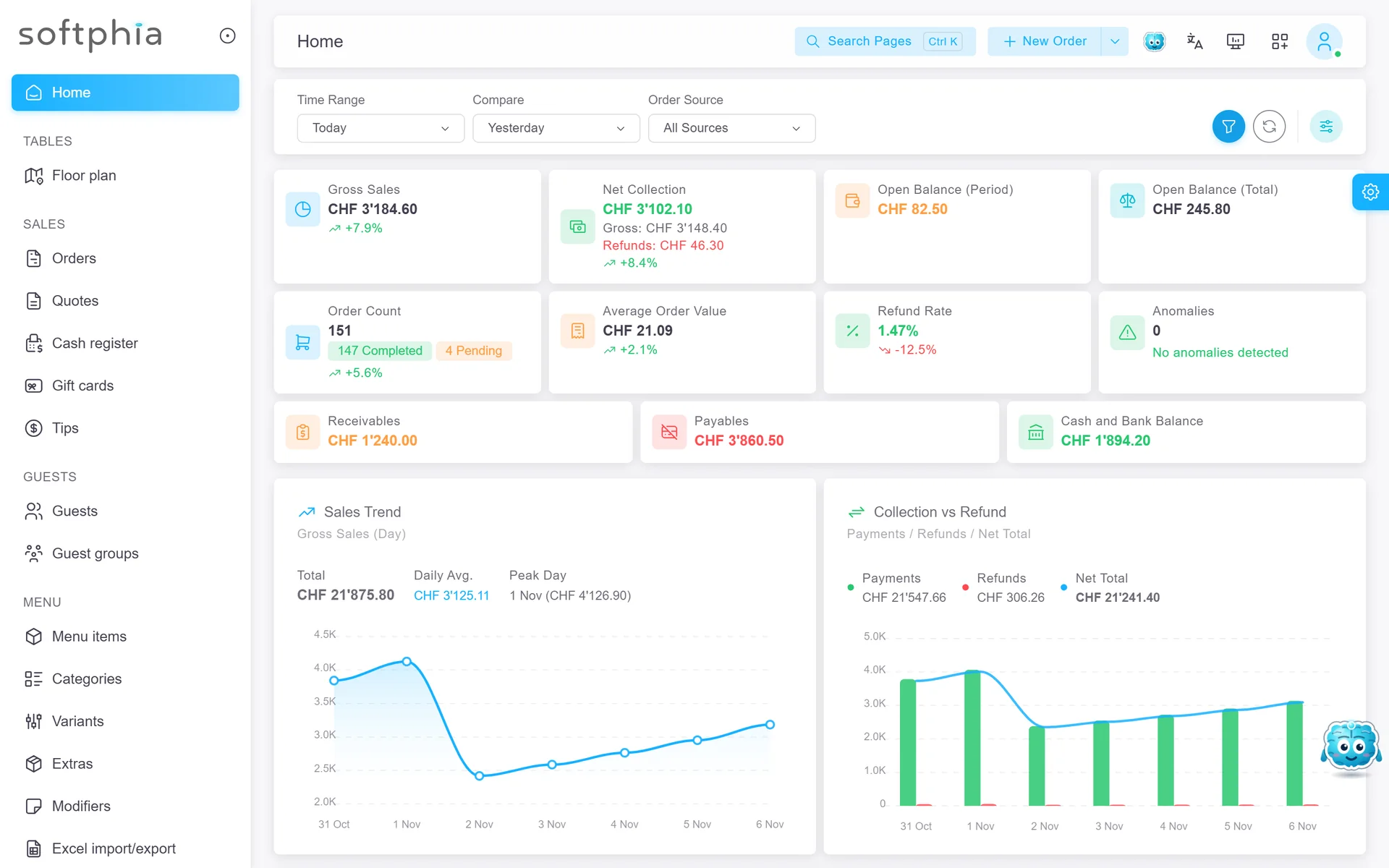
SoftSI is built into the Softphia panel, into SoftPOS at the till, into SoftBoss and into this website. It works with the permissions of the person using it, shows every change on a card before anything happens, never deletes anything and never takes or moves money itself.

SoftSI · The assistant that knows your business and asks before it acts.
Runs on
SoftPanel, SoftPOS, SoftBoss, softphia.ch
Languages
English, German, French, Italian, Turkish, Spanish, Portuguese, Russian
Price
Part of Softphia Core · See the price list

SoftSI

What it does

In SoftPanel

  • Finds customers, products, orders and invoices by description
  • Prepares quotes and work orders, adds customers, products and suppliers, books appointments and tables
  • After your approval: records a sale, takes a delivery into stock, plans a price change for a whole category
  • Imports your price list from a spreadsheet; reads a photo or a PDF to help you add items
  • Help mode: explains how Softphia works, free of charge

In SoftPOS, at the till

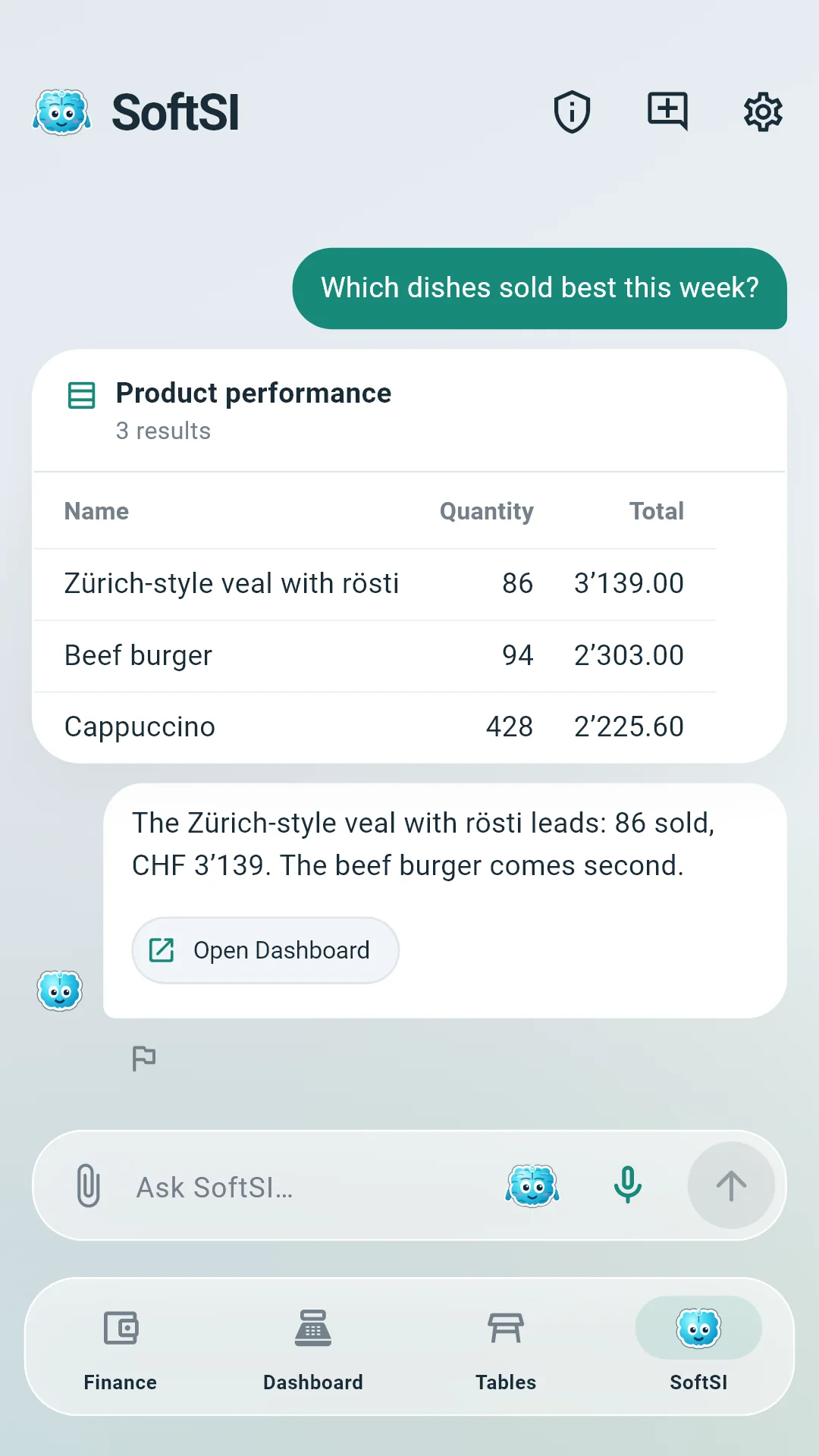
  • Finds the cart, the tables, the queue, the orders, the catalogue, the customers and the shift, and answers questions about the day’s takings
  • Opens a table or a takeaway order, adds and changes lines with their extras and notes, sets the customer and the cover count: each change shown on a card the cashier approves
  • Prepares a payment, a refund, a void, a cash movement or the register’s opening and closing and hands it to the cashier, who completes it on the till’s own screen; SoftSI never takes or moves money itself
  • Voice conversation at the till, after the cashier agrees to its notice
  • Your business switches SoftSI on for its tills in the panel

In SoftBoss

  • Answers questions about customers, stock, sales and bookings, by text or voice
  • A natural voice conversation, after your consent, with a spoken answer

On this website

  • Answers visitors’ questions about modules, prices and the right setup, from Softphia’s own catalogue
  • Guides you to a priced setup and opens the free trial

Safety by design

  • Every change with a business effect waits for your approval; high-impact changes also ask for your password or authenticator code
  • Prices, taxes and totals are always calculated by Softphia, never by the AI
  • It only sees what the person asking may see; your data is not used to train AI models
  • Every request is recorded with its steps, approvals and cost, and you can report any answer

What you need

  • Nothing extra: SoftSI is part of Softphia Core. Every paid subscription includes 500 credits a month; credit packs of CHF 10, 25 and 50 add more
  • A role that allows SoftSI; you decide which staff may use it

What it does not do

  • It never deletes anything and never takes or moves money itself: a payment, a refund, a void or a cash movement it prepares is completed by a person on the screen made for it. It never changes users, roles, permissions or your subscription, and sends nothing you have not approved
  • Like any AI it can misunderstand; read the card before you approve

Questions and answers

Can I turn SoftSI off?

Yes.

  • For each person: using SoftSI is a permission in the role editor. Leave it out of a role, and the people with that role do not see SoftSI in the panel or in SoftBoss. Everything else in Softphia works as before.
  • For the whole business: the admin role always keeps every permission, SoftSI included. If you want SoftSI switched off for everyone, contact Softphia support.

When nobody uses it, SoftSI uses no AI credits. None of your records depend on SoftSI: quotes, sales and everything else work the same whether it is used or not.

Can my staff use SoftSI?

Yes. Using SoftSI is a permission in the role editor, like any other.

  • The person who signed up holds the admin role, which includes SoftSI. For the roles you create, you decide whether their holders may use it. People without it do not see SoftSI in the panel or in SoftBoss.
  • SoftSI works with the permissions of the person using it. If a cashier’s role does not allow quotes, SoftSI cannot make a quote for that cashier either; the step is refused and the reason is shown.
  • Every person has their own conversation, and a change with a business effect waits for the approval of the person who asked for it.
  • Seeing the AI credits needs access to the subscription, and buying credit packs needs the right to manage it.
Can SoftSI delete records or make payments?

It never deletes anything and never pays money out. Some work is never left to SoftSI, whatever you ask and whatever your role:

  • It never deletes anything, not even a draft it created itself.
  • It never refunds a payment, never cancels a sale, never pays a supplier, never moves money between accounts and never takes a payment at the till.
  • It never changes users, roles, permissions, passwords or your subscription.
  • It never opens or closes a till.
  • It never sends anything you have not approved: it emails a quote or an invoice to your customer only once you approve the address. It sends no text message itself; a booking it makes notifies the customer only as your notification settings say.

These actions cannot be taken back or decide who has access, so a person does them on the screen made for them.

At the till, SoftSI can prepare a payment, a refund, a void, a cash movement or the opening and closing of the register, but the cashier always completes them on the till’s own screen.

Money coming in is the one exception. SoftSI can record a payment your customer has already made, on a sale or on an invoice that bills several sales. It shows you the payment on an approval card first and records nothing until you approve with your password or the code of your authenticator app.


Can SoftSI make mistakes?

Yes. SoftSI uses an AI model, and like any AI it can misunderstand a request, pick the wrong record or word an answer badly. Softphia is built so that a mistake stays small and visible:

  • SoftSI only works with records it has found in your data. When two customers or products match, it asks you which one you mean.
  • Prices, taxes and totals are always calculated by Softphia, never by the AI.
  • What SoftSI does on your word alone, such as a quote draft, a new customer or a booking, can be changed or removed on its screen.
  • Every change with a business effect is shown to you first, value by value, and only happens once you approve it. Read the card before you approve.
  • SoftSI never deletes anything and never pays money out.

The answers of the advisor on the Softphia website are generated from Softphia’s public catalogue and may be incomplete. If an answer looks wrong, ask again in other words or do the task on its screen.

Does SoftSI see my data, and is it used to train AI?

SoftSI reads only what a request needs, and only what the person asking may see. It has no access of its own to your data: it looks records up through the same functions as the Softphia screens, with that person’s permissions.

  • The AI model receives the request, the conversation and the results of the look-ups made for it. From a list it receives only the fields it needs, such as a customer’s name and phone number.
  • The AI model is provided by OpenAI, which processes these requests under its terms with Softphia. Softphia does not use your data to train AI models.
  • The password or code you type to approve an important change is checked by Softphia and never passed to the AI.
  • The Help mode answers from the Softphia guide, not from your records.
  • The advisor on the Softphia website sees no business data at all. Please do not type personal details into it.
How do SoftSI’s approvals protect me?

Before SoftSI books a sale, issues an invoice, takes goods into stock or makes any other change with a business effect, it shows you a card with exactly what will be sent: the customer, the branch, every line and its quantity. Nothing happens until you click Approve.

  • The approval comes from Softphia, not from the AI. Only your click creates it, so the AI cannot approve anything on its own.
  • It covers exactly the values on the card. If anything else would be sent, the step is stopped.
  • It works once and only for a short time, and a step never runs twice.
  • For high-impact changes, such as a new price for many products at once or a supplier’s bill, you also confirm with your password or the code of your authenticator app.
  • Even an approved step is checked like any action on the screens: if your role does not allow it, it is refused.

Look-ups, and drafts you can still change, such as a quote draft, run straight away on your word.

Frequently asked questions

More Softphia products

Your next working day starts here.

Open your workspace, pick your kind of business and bring your team in. Garage, salon, shop or café: the setup is ready for you.